Reviewed · SEOUL TOURS
South Korea: Unlimited Data and Voice eSIM
An eSIM that gets you online fast is gold.
This Korea plan is built for unlimited 4G LTE data on SK Telecom, and you activate it with a QR code right after you arrive. I also like that hotspot sharing is supported, so you can keep multiple devices connected without hunting for Wi-Fi. The one drawback to think about first is simple but important, you must have an eSIM-compatible phone and an unlocked device, or you will only get the data part.
You also get an optional voice and SMS layer, but only after online passport verification during set hours. Activation timing depends on hours connected to the SKT network, so plan for that when you land, especially if you arrive late. The value is strong for short trips, with a price around $7 per person and plans in the broad 2 to 90 day range, but you will want to confirm the exact start time option you book.
In This Review
- Key Things I Think You’ll Care About
- Unlimited SK Telecom Data, Plus a Backup Plan for Voice and SMS
- Before You Buy: The Real Requirements Check (It Matters)
- What You Get: Unlimited Data, Voice Credits, Hotspot
- QR Code Setup: The Moment Your Phone Should Come Alive
- Activation Timing: Don’t Assume It Starts the Minute You Install It
- Voice and SMS Verification: How to Turn On the Call Feature
- Airport Arrival Reality: What Makes the Setup Feel Easy
- Using Your eSIM Day to Day: What It’s Like on the Ground
- If Things Go Wrong: Clear Fixes and When to Contact Support
- Price and Value: Why $7 Can Be Worth It
- Who This eSIM Fits Best
- Should You Book This South Korea Unlimited Data eSIM?
- FAQ
- How do I get the correct eSIM QR code?
- When does the eSIM start working in South Korea?
- Is the data plan really unlimited?
- Can I use the eSIM as a hotspot?
- Do voice calls and texts work right away?
- What documents do I need?
- What if my phone shows an error like QR code is invalid?
- Can Korean passport holders buy this eSIM?
- Is there a refund if the eSIM has already been issued?
Key Things I Think You’ll Care About
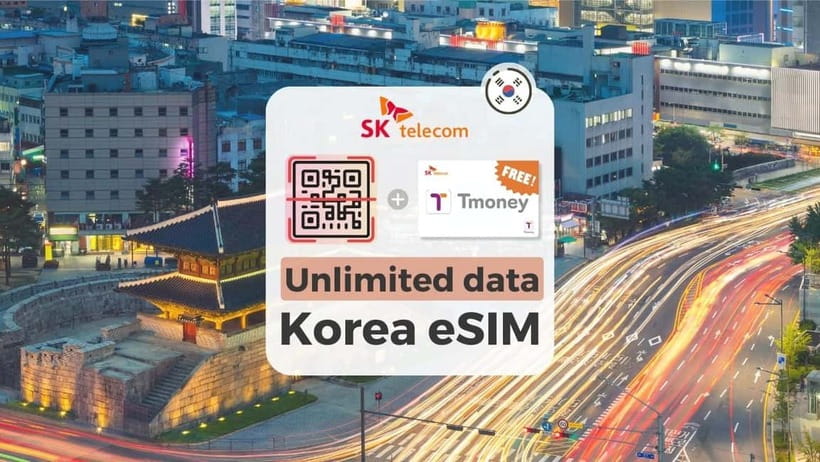
- Unlimited data without speed throttling on SK Telecom’s LTE network
- QR setup that kicks in once you’re in Korea, not before
- Hotspot sharing supported, great if you travel with more than one device
- Voice and SMS available after passport verification, with a Korean phone number
- Long validity windows (2 to 90 days) so you can match it to your trip length
- Phone and paperwork requirements matter, especially eSIM compatibility and an overseas passport
Unlimited SK Telecom Data, Plus a Backup Plan for Voice and SMS
If your trip to South Korea depends on maps, messages, and translation, stable data is not a luxury. This eSIM is designed for that moment you step off the plane and want your phone to just work. The big win is unlimited 4G LTE data with SKT as the carrier, so you are not rationing data for day one.
Where it gets more interesting is the optional calling and texting. The plan includes incoming calls and texts with no extra charges, and it can provide a Korean phone number. But those voice and SMS features only turn on after you complete passport verification through SK Roaming’s system, and that verification has operating hours.
That combination means you can use the eSIM as data immediately upon arrival, then layer in calling later if you need it. It is a practical setup for most tourists, especially if you mainly rely on WhatsApp, KakaoTalk, maps, and transit apps and only want a number for local confirmations.
A few more Seoul days worth comparing
- Best DMZ Tour Korea from Seoul (Red Suspension Bridge Optional)
★ 5.0 · 41,422 reviews - DMZ Tour: 3rd Tunnel, Option(Suspension Bridge, Boat) from Seoul
★ 5.0 · 21,373 reviews - DMZ tour south Korea from Seoul (NK experience hall, defector)
★ 5.0 · 20,599 reviews
Before You Buy: The Real Requirements Check (It Matters)
This is the part most people rush, and then they get stuck. I recommend you do a quick eligibility check before you pay.
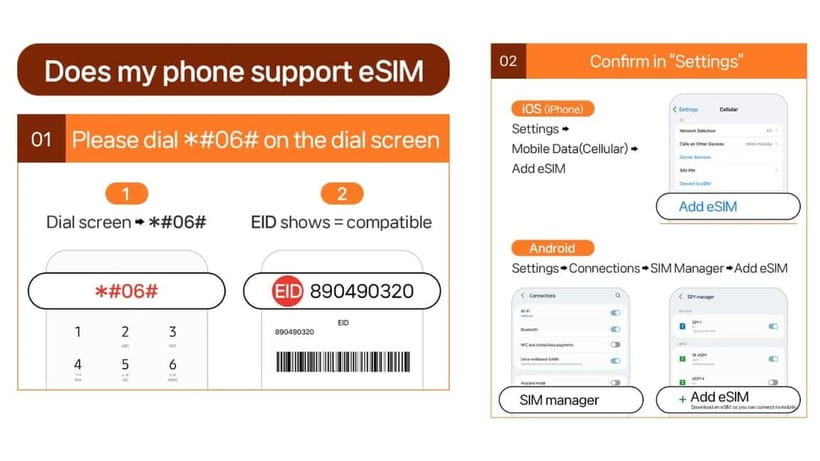
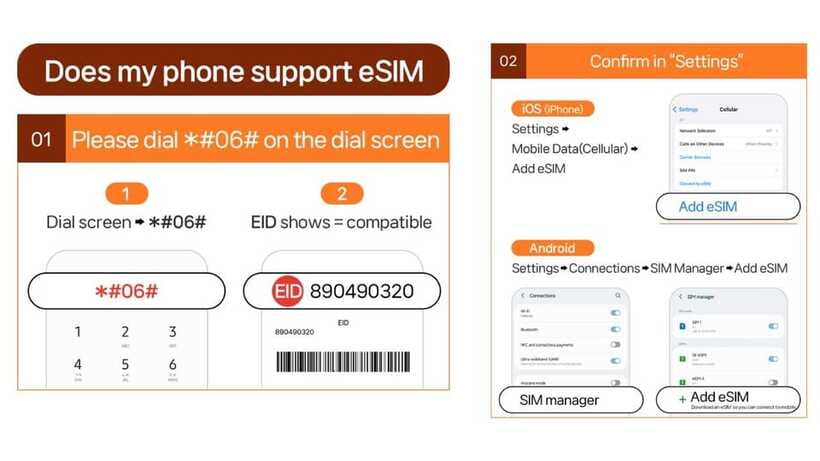
First, confirm your phone supports eSIM. You can check by pressing #06# on the dial screen and looking for EID. If you do not see EID, the phone may be incompatible with eSIM activation. Second, your phone should be fully unlocked so it can accept a foreign SIM profile. This matters especially if your phone provider is in the United States, Canada, Japan, or the Philippines.
Next, verify the passport rules. Only foreigners with an overseas passport are eligible, and Korean passport holders cannot buy. Also note the residency angle: this is a short-term tourist product, and people with long-term residency of 91 days or more could face service limitations or suspension without refunds.
If you are unsure, contact LINK KOREA early, rather than waiting until your phone is already half-configured on arrival day. One strong sign of reliability from actual customer experience is fast support when setup details do not arrive on time.
What You Get: Unlimited Data, Voice Credits, Hotspot
Here is what is included on the data side: unlimited data on 4G LTE with no speed throttling. In real day-to-day use, that usually means you can do navigation, upload photos, and stream without worrying that you will hit a hard cap.
Hotspot sharing is supported. That is a big deal if you travel with a second phone, a tablet, or a laptop for work. Instead of searching for cafes or asking strangers for Wi-Fi passwords, you can share your connection from your phone.
On the voice and SMS side, the plan is not just a simple add-on. You receive complimentary voice credits worth 2,640 KRW, which is roughly 10 minutes of domestic calls in Korea. You also get a Korean phone number after verification, and incoming calls and texts are included.
Outgoing calls and SMS are not included. So if you plan to make lots of calls to numbers outside your contact lists, you may end up relying more on messaging apps than traditional dialing.
QR Code Setup: The Moment Your Phone Should Come Alive
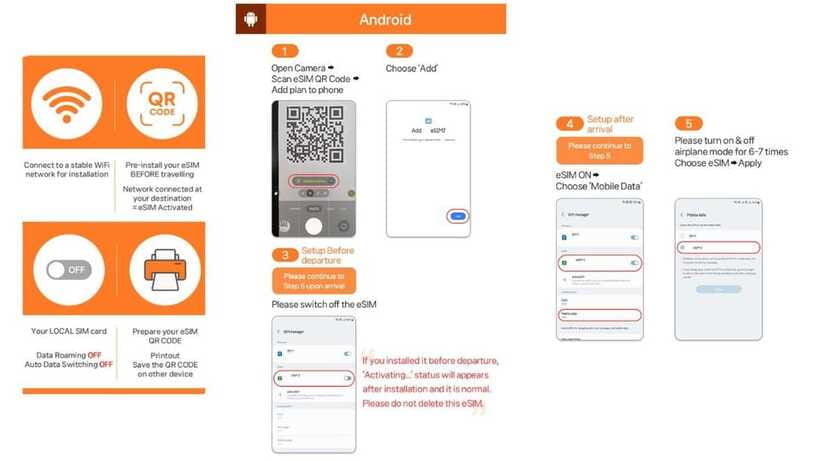
You do not activate this eSIM before you land in Korea. The plan is set up so the connection to the local network happens after you arrive.
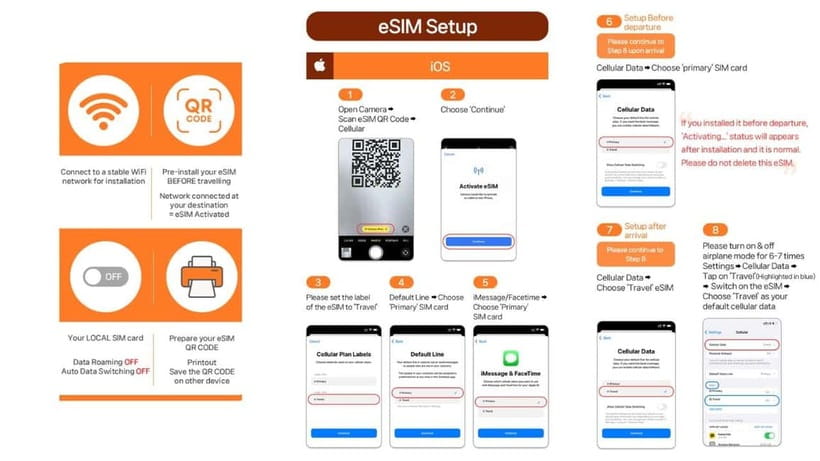
Important detail that saves headaches: the QR code in your voucher is not the eSIM QR code. The eSIM QR code is delivered separately by email about one day before your activity date. That means you should watch your inbox and spam folder in the day before arrival.
When you have the correct eSIM QR code, you scan it to install the profile. Then, once your phone is physically in Korea and connected to SK Telecom’s network, activation begins based on the plan’s timing rules.
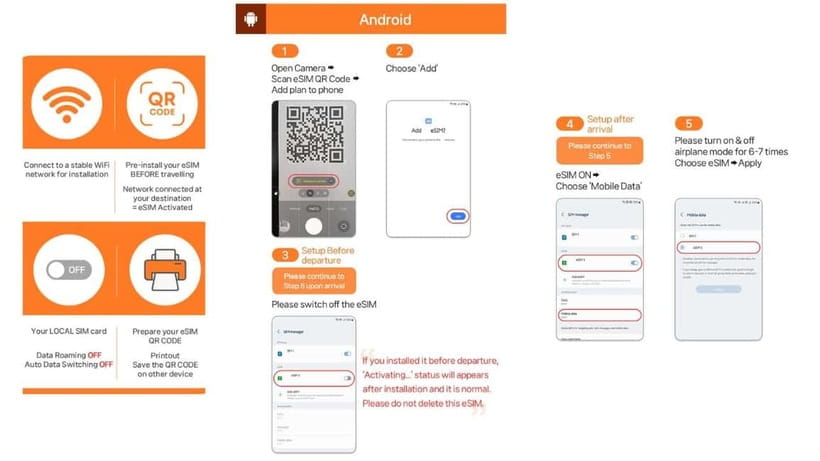
A helpful troubleshooting approach is spelled out for the common issue where the phone shows something like QR code is invalid. If that happens, go into your iPhone cellular settings (Settings > Cellular) or Android connections and SIM manager, and check whether a new eSIM profile appears on the device. If it does, you may not need to re-scan. If it does not, reach out to LINK KOREA using email or WhatsApp.
Same trip, a different corner of the country:
- Seoul: The Best DMZ Tour with Optional Suspension Bridge
★ 4.7 · 4,978 reviews - Signature DMZ Tour: Exclusive Defector Talk & Suspension Bridge
★ 5.0 · 4,459 reviews - Thrilling Korean DMZ 3rd Tunnel Tour from Seoul + Red Bridge Rush
★ 5.0 · 3,097 reviews - Seoul: DMZ Tour & Suspension Bridge (Option English/Spanish)
★ 4.9 · 2,628 reviews
Activation Timing: Don’t Assume It Starts the Minute You Install It
This plan has timing rules based on hours connected to SKT. For example, a 3-day option may activate at a specific hour and end 72 hours later at the same hour, rather than simply counting calendar days.
So here is the practical move: when you land, connect to data, and let your phone register the SKT network so activation starts on the schedule you paid for. If you install the eSIM profile but your phone never connects, activation may not begin as expected.
This also means that if you arrive very late at night or your connection timing is odd, you may want to give it a bit of time after landing before you assume your plan is fully active.
Voice and SMS Verification: How to Turn On the Call Feature
Data is the easy part. Voice and SMS require an extra step, and it is worth understanding before you arrive.
The voice and SMS functions use a User ID (Passport) Verification System on SK Roaming. Verification is available daily from 08:00 to 22:00. You also should know that verification can only be performed 1 hour after entry, so if you land and try to complete verification immediately, it may not work yet.
Only one phone number can be registered per passport. If you are traveling as a group and each person has their own passport, that is usually fine, but it does mean you cannot treat a single passport as a shortcut for multiple lines.
There is also a key ordering rule. The eSIM can be used for data only until you complete verification online. After verification, a 010 phone number and voice and text features are provided.
If you want to keep calling after your included credits, you will need to recharge online. The recharge website is listed as https://skroaming.com/reservation/charging.
Airport Arrival Reality: What Makes the Setup Feel Easy
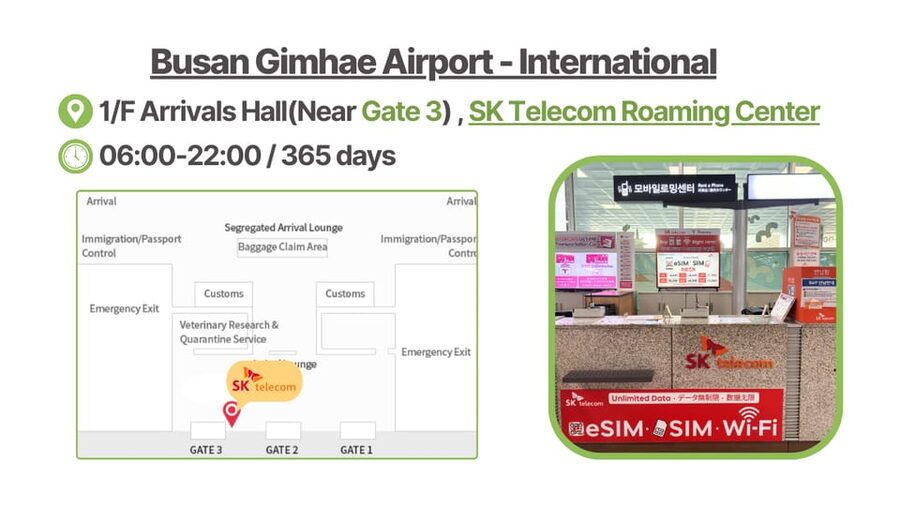
You will likely care about one thing above all: will you be online quickly after landing.
In customer experience, convenience is not just about the product, it is about support. People who hit an email problem were able to contact LINK KOREA, communicate quickly, and have the correct email resent so they could receive the QR code in time.
Also, when on-arrival help is available, it can turn a stressful tech setup into a straightforward one. In one case, support helped with an immediate connection, and data worked right away.
And if your phone cannot do eSIM, you are not necessarily out of luck. There is at least one example where a physical SIM card option was used instead and worked well during the stay. The safest move is still to check your device support in advance, then contact LINK KOREA if you need a different setup.
Using Your eSIM Day to Day: What It’s Like on the Ground
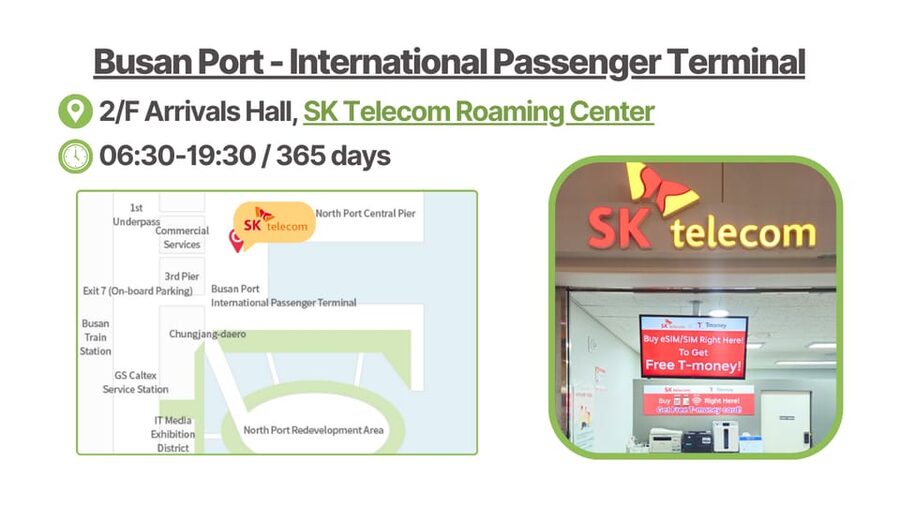
Once active, the experience is straightforward: you should have stable 4G LTE data, and you can use transit and mapping apps without babysitting your connection.
Here are the practical ways this helps in South Korea:
- You can plan routes in real time, including subway and bus changes
- You can translate signs and menus quickly using camera-based tools
- You can use ride hailing and delivery apps that require location and a live connection
- You can keep messaging apps working without relying on hotel Wi-Fi
The ability to share your connection via hotspot means you can also support travel companions without a second eSIM. Just remember that hotspot use can drain your phone battery faster, so a portable charger is still a smart travel accessory.
If you add voice and SMS, think of it as a fallback tool. You may still mainly use messaging apps, but having a Korean number can help for certain confirmations and local steps.
If Things Go Wrong: Clear Fixes and When to Contact Support
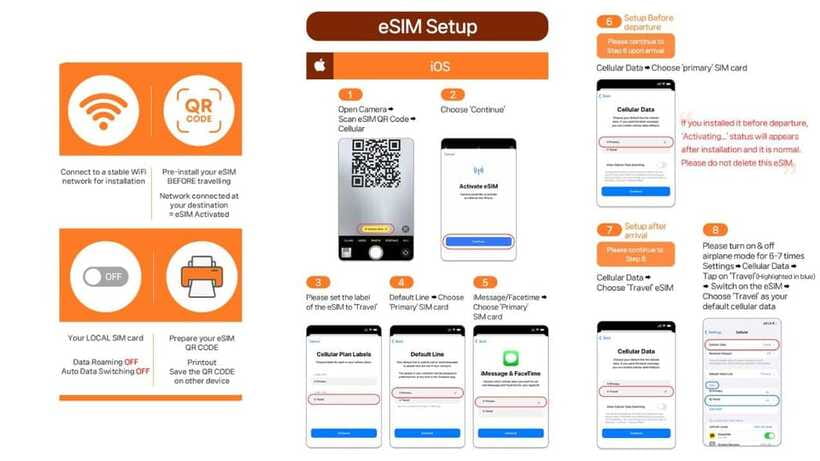
Even with a well-designed eSIM, tech issues happen. This plan includes guidance that can help you move past the common points of failure.
If you see a QR code error such as QR code is invalid:
- Check your device’s eSIM or SIM manager screen to see whether the eSIM profile installed
- If it installed, you may need to enable it rather than re-scan
- If you cannot find the new eSIM profile, use the supplier contact route promptly
The support contact details are specific:
- Email: [email protected]
- WhatsApp: https://wa.me/message/R7WRWPD6T67UM1
Also, keep in mind that activation happens after arrival once your phone connects to SK Telecom’s network. So if you install the profile before you land, do not expect it to function until you are in Korea.
Finally, keep your passport handy for the voice and SMS verification step. If you delay it until after your trip starts, you may spend the first day mostly on data anyway, which is still workable.
Price and Value: Why $7 Can Be Worth It
At about $7 per person, the value is mostly about one thing, you are buying predictable connectivity. In South Korea, you will use your phone constantly for navigation and information, and having unlimited data without speed throttling helps you stay confident that your connection will not suddenly become frustrating.
Where value gets even better is the flexibility in validity, with options from about 2 up to 90 days. That means you are not forced into a short time frame if you have a longer stay, and you are not overpaying if you just need a couple of weeks.
The added voice and SMS feature also changes the value equation. It is not that you must call a lot, it is that you can if you need a Korean number. The included 2,640 KRW voice credits add a small buffer so you can test call capability or handle a quick local call.
The only value trap is mismatched expectations about what is included right away. Data works from activation after arrival. Voice and texts require verification later. If you need calling on day one, you should plan your verification timing around the operating hours.
Who This eSIM Fits Best
This setup is best for:
- Solo travelers and couples who want unlimited data for maps and messaging
- People who plan to use hotspot sharing for a tablet or a second phone
- Tourists who mainly use messaging apps but want voice and SMS as a backup
- Travelers who want the simplicity of QR installation and carrier-based LTE
It may be less ideal if:
- Your phone is not eSIM-compatible or you cannot get it unlocked
- You urgently need outbound calls and SMS right away, since outgoing is not included
- You cannot handle the passport verification step or miss the verification window
If any of those apply, contact LINK KOREA before departure. A quick message can save you from arriving with a setup that only does data.
Should You Book This South Korea Unlimited Data eSIM?
I would book it if you want unlimited 4G LTE and you have an eSIM-ready, unlocked phone. The setup is built for arrival day, and the hotspot support adds extra usefulness when you travel with more than one device.
Skip it, or at least be cautious, if you are relying on voice and SMS on day one. Those features need online passport verification and work on set hours, so your first hours in Korea may be data-only until verification is done.
If you are on the fence, here is my quick decision checklist:
- Does your phone show EID with #06#?
- Is it unlocked for foreign SIM profiles?
- Do you have an overseas passport and you are under the short-term eligibility?
- Can you complete verification during the 08:00 to 22:00 window after entry if you need calls?
If you can say yes to most of that, this is a solid, low-stress way to stay connected in South Korea.
FAQ
How do I get the correct eSIM QR code?
The QR code in the voucher is not the eSIM QR code. The eSIM QR code is delivered to you separately by email about 1 day before the activity date.
When does the eSIM start working in South Korea?
The eSIM connects to the local SK Telecom network after you arrive in Korea. Activation timing starts instantly when connected to SKT’s network, based on the plan’s timing hours.
Is the data plan really unlimited?
Yes. The eSIM includes unlimited data on 4G LTE without speed throttling.
Can I use the eSIM as a hotspot?
Yes. Hotspot sharing is supported.
Do voice calls and texts work right away?
Voice calls and SMS require online verification. Until the verification is completed, the eSIM can be used for data services only.
What documents do I need?
You need your passport for the passport verification process.
What if my phone shows an error like QR code is invalid?
Check your device settings for whether a new eSIM profile appears. On iPhone, look under Settings > Cellular. On Android, check Settings > Connections > SIM Manager. If it still fails, contact LINK KOREA by email or WhatsApp.
Can Korean passport holders buy this eSIM?
No. Only foreigners with an overseas passport are eligible.
Is there a refund if the eSIM has already been issued?
No refunds are provided after the eSIM is issued. The data-only limitations or suspension for travelers staying 91 days or longer are also not eligible for refunds.
Recently reviewed in Seoul
- You’re Invited to Our Home in Seoul: The Only Cooking Class!★ 5.0 · 8 reviews
- Your Personal Seoul Photographer!★ 4.1 · 15 reviews
- From Seoul: Yongpyong Ski Day Tour with Transportation★ 4.9 · 40 reviews
- Seoul: Korean & English Language Exchange Global Party★ 5.0 · 28 reviews
- Watching sports match & local food experience in Seoul★ 5.0 · 11 reviews
- WKT Combat Taekwondo & Self-defense One Day Class in Seoul★ 5.0 · 5 reviews
- Unique Native Experience : Han River Picnic, Board game, BBQ★ 5.0 · 3 reviews
- Seoul: Gangneung BTS K-Pop & K-Drama Filming Locations Tour★ 4.6 · 14 reviews
Seoul Tours, compared.
Best DMZ Tour Korea from Seoul (Red Suspension Bridge Optional)
Read our review →
DMZ Tour: 3rd Tunnel, Option(Suspension Bridge, Boat) from Seoul
Read our review →
DMZ tour south Korea from Seoul (NK experience hall, defector)
Read our review →
The Best DMZ Tour with Optional Suspension Bridge
Read our review →
Signature DMZ Tour: Exclusive Defector Talk & Suspension Bridge
Read our review →
Thrilling Korean DMZ 3rd Tunnel Tour from Seoul + Red Bridge Rush
Read our review →
DMZ Tour & Suspension Bridge (Option English/Spanish)
Read our review →