Reviewed · SEOUL TOURS
South Korea eSIM (3-30 days. Up to 45GB)
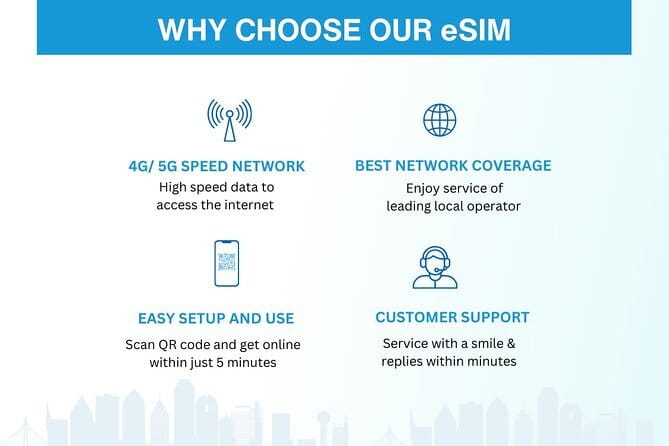
Fast internet beats travel stress. This South Korea eSIM is built for one job: keep your phone working from the moment you land, with data for maps, messages, and home. I like that the eSIM arrives by email, you scan a QR code to activate it, and you can be online within minutes, not hunting for a SIM kiosk. I also like the practical network experience reported in real use, including auto-connecting to the best local network for strong signal.
The main thing to watch is compatibility. You need an eSIM-capable phone (for example iPhone XS or later, Pixel 3 or later, Samsung S20/S21/Fold), and setup can require a quick restart to fully activate. Also, once you hit the high-speed limit, your speed switches to 3G, so plan heavy streaming accordingly.
In This Review
- Key things you’ll notice right away
- What This South Korea eSIM Really Does for Your Trip
- Getting the eSIM Before You Go, Without Airport Chaos
- Speeds, Data Caps, and What Happens After You Hit the Limit
- Coverage in South Korea, From Seoul to Jeju-Style Detours
- How Setup Usually Goes on Arrival (And the One Trick That Helps)
- Value Check: Why $5 Can Be a Smart Deal for Seoul
- Potential Downsides You Should Actually Plan For
- Who This eSIM Is Best For (And Who Should Think Twice)
- Should You Book Xplori’s South Korea eSIM?
- FAQ
- What devices support this South Korea eSIM?
- How do I activate the eSIM once it arrives?
- Do I need to pick up a SIM in Seoul?
- What network speeds do I get?
- Is there a data limit?
- Does it work beyond just Seoul?
- Is there customer service if something goes wrong?
- Can I cancel and get a full refund?
Key things you’ll notice right away
- Email delivery plus QR activation means less airport hassle and quicker connection
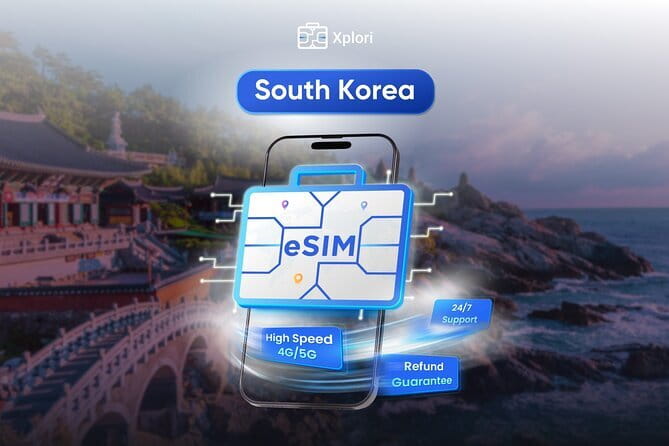
- 4G/5G where available helps with real-time navigation and streaming
- High-speed data has a cap, then speeds switch to 3G
- Auto network selection has worked reliably from Seoul to Jeju island for multiple users
- Remote customer support by email is included, so you can troubleshoot remotely
- No physical pickup, it is a purely digital product
What This South Korea eSIM Really Does for Your Trip
This is not a sightseeing product, it is a connection tool. The value is that you start your South Korea trip already set up to use mobile data, so you can rely on your phone for the basics: transit directions, translation apps, finding the right street, and staying in touch with friends and family back home.
The plan is sold in day ranges from 3 to 30 days, so it fits everything from a short Seoul weekend to longer stays that may include side trips. It also promises local rates for data, which matters because roaming charges can get ugly fast if you forget to switch off the wrong thing.
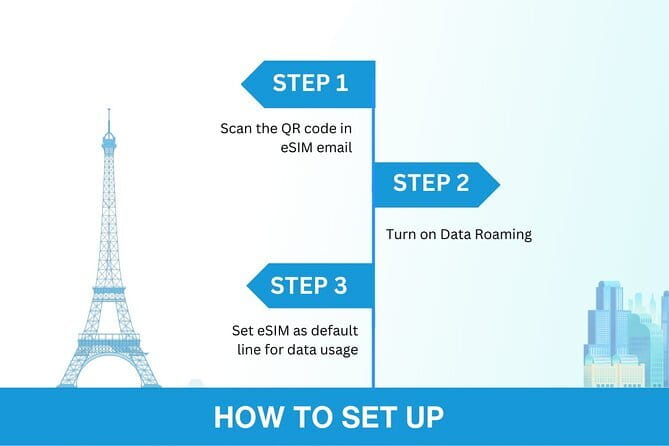
One more useful detail: activation is designed to be simple. You receive the eSIM by email, scan the QR code, and connect in minutes. That is a big deal on travel days when your brain is already full of flight times, luggage, and where you left your charger.
A few more Seoul days worth comparing
- Best DMZ Tour Korea from Seoul (Red Suspension Bridge Optional)
★ 5.0 · 41,422 reviews - DMZ Tour: 3rd Tunnel, Option(Suspension Bridge, Boat) from Seoul
★ 5.0 · 21,373 reviews - DMZ tour south Korea from Seoul (NK experience hall, defector)
★ 5.0 · 20,599 reviews
Getting the eSIM Before You Go, Without Airport Chaos
Here is how the process is meant to work, and why it is better than the usual airport SIM scramble.
First, you order and receive the eSIM delivery by email. There is no meetup, no physical handoff, and no pickup location. It is purely digital, so the practical upside is time saved and fewer distractions right after you land.
Next, you activate using the QR code. The product description is clear that once you scan the QR code and activate the eSIM profile, you should be connected within minutes. That is what you want: fast access for maps and communication, not a half hour of trial-and-error while you are trying to find the right subway entrance.
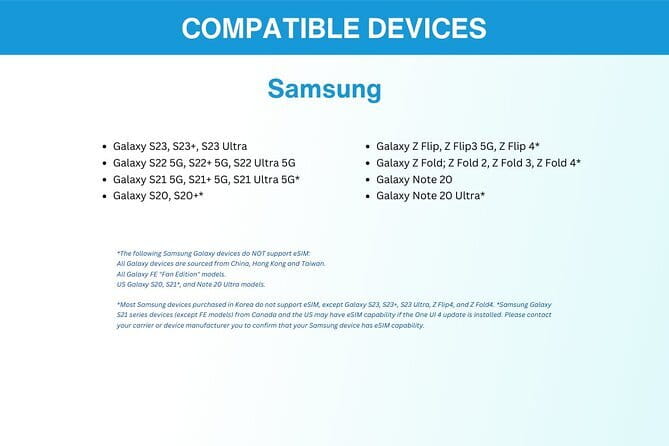
A small but important reality check: this will only work if your phone supports eSIM. The product specifically calls out compatible models like iPhone XS and later, Pixel 3 and later, and Samsung S20/S21 and Fold. Before you buy, confirm your exact model and whether your phone is set up to use eSIM at all. If you are unsure, contact Xplori in advance and ask.
Speeds, Data Caps, and What Happens After You Hit the Limit
You get 4G/5G data where available. That is the sweet spot for travel because it supports more than just basic messaging. In real use, streaming and video calls have been described as fine, which is exactly what you need when you want to share your day or watch a map without constant buffering.
But there is a catch, and it is clearly stated: high-speed data usage is capped at the amount shown for the plan. After you use that high-speed portion, the connection switches to 3G speed.
What this means for you:
- Light users can often get by without thinking too hard about the cap. Maps, messaging, and occasional photo uploads are usually manageable.
- If you plan to stream video, download offline content, or upload lots of photos daily, you should watch your usage early.
- For longer trips, it helps to set your expectations. Think of the cap as your “easy mode,” then shift to a more data-saver routine once you cross it.
Also, one odd line in the product details says the data plan covers all Canadian provinces. Since this is a South Korea product, treat that as something to confirm directly with the provider before you rely on it. A quick email to Xplori is worth it if you want zero surprises.
Coverage in South Korea, From Seoul to Jeju-Style Detours
The location is Seoul, South Korea, but the practical question is whether it works beyond one neighborhood. While no full coverage map is provided here, real use includes reliable connectivity from Seoul to Jeju island. That is a strong clue that the eSIM is not limited to one city block.
Another helpful point from the product description is that it is meant to keep you connected during your journey so you can plan and navigate. In other words, it is meant for the entire trip, not just the first day in the capital.
The best part is the way it connects. One of the most praised aspects is that the eSIM connects to the best local network automatically, helping keep signal strong. That matters because South Korea is packed with dense areas where manual selection can be annoying, especially when you are walking and trying to keep your phone from dropping signal.
If you are planning day trips or island time, you do not want to be forced into hunting for Wi-Fi. This plan is designed for the opposite: keep mobile data working so you can move without pauses.
Same trip, a different corner of the country:
- Seoul: The Best DMZ Tour with Optional Suspension Bridge
★ 4.7 · 4,978 reviews - Signature DMZ Tour: Exclusive Defector Talk & Suspension Bridge
★ 5.0 · 4,459 reviews - Thrilling Korean DMZ 3rd Tunnel Tour from Seoul + Red Bridge Rush
★ 5.0 · 3,097 reviews - Seoul: DMZ Tour & Suspension Bridge (Option English/Spanish)
★ 4.9 · 2,628 reviews
How Setup Usually Goes on Arrival (And the One Trick That Helps)
Even when an eSIM is simple, your arrival day can still be chaos. Here is the most practical way to think about it based on what people report.
On landing, you usually need to turn on your data roaming so the eSIM profile can actually pass data. That might sound obvious, but it is the difference between having an active plan and having an active internet connection.
Then comes the small fix that can save you a lot of frustration. One user noted that restarting the device helped fully activate the eSIM. If you scan your QR code and it looks installed but data is not working, do not immediately panic. Try turning the right settings on, then restart your phone and test again.
Also, keep in mind that eSIM activation happens through your phone settings. That means you should be ready to do setup without a physical SIM tool. If you want to avoid last-minute delays, do the activation process before you leave your hotel on day one, not in the subway station.
Value Check: Why $5 Can Be a Smart Deal for Seoul
At a stated price of $5.00 per person, the big question is not just cost. It is whether the eSIM prevents the usual travel pain.
Airport SIMs have three common problems:
1) You lose time when you are already tired.
2) The process can be stressful if language is a barrier.
3) You might still end up with the wrong plan if you guess wrong about data needs.
This eSIM aims to remove those friction points by letting you prepare ahead of time, with QR activation and a local-rate data plan. If you are the kind of traveler who uses your phone for everything, that time saved can be worth more than the difference in price.
The also-noticeable value factor is support. Remote customer service is included, and the instructions say you can email them if you need help or if you are unsure about phone compatibility. For a digital product, that human backup is important.
One more value detail: you choose a duration from 3 to 30 days. That flexibility matters when you do not want to pay for a longer plan just because it was the easiest one to find.
Potential Downsides You Should Actually Plan For
I like this setup, but it is not perfect, and you should go in with your eyes open.
1) You must have an eSIM-capable phone.
If your phone does not support eSIM, you cannot use this product. The listed compatible models are iPhone XS and later, Pixel 3 and later, and Samsung S20/S21/Fold. If you are between models or not sure, contact Xplori ahead of time.
2) Speed drops after the high-speed cap.
Once the high-speed data limit is reached, speed switches to 3G. If you plan lots of streaming or heavy uploads, you will feel it sooner.
3) Digital means you need to be ready to troubleshoot.
There is no local pickup where someone can hand you a working SIM. If activation goes sideways, you rely on email support and basic phone troubleshooting like enabling the right roaming setting and restarting your device.
Who This eSIM Is Best For (And Who Should Think Twice)

This is a great match if you are:
- Staying in Seoul and want reliable mobile data for maps, transit, and daily planning
- Taking a longer trip where you would rather avoid buying and managing a physical SIM
- Traveling with a phone that supports eSIM and you are comfortable doing QR-based activation
It may not be the best match if you:
- Have an older phone that does not support eSIM
- Plan to stream high-quality video nonstop for days
- Want a setup you can do entirely after arrival with zero device tinkering
If you are a “set it and forget it” traveler, you still can do that, but you should spend a few minutes checking compatibility and running through activation before you are pressed for time.
Should You Book Xplori’s South Korea eSIM?
If you want a simple, low-cost way to stay connected across your South Korea trip, this is an easy yes. The combination of email delivery, QR activation, and automatic connection behavior makes it feel like the kind of thing you should have done before you landed.
I would book it if:
- You have an eSIM-capable phone
- You plan to use your phone heavily for navigation and staying in touch
- You value not dealing with airport SIM counters and language friction
I would hesitate if:
- You are not confident your phone supports eSIM
- You expect unlimited high-speed data for streaming heavy use
- You cannot spare a few minutes for activation and, if needed, a restart
Overall, for $5 and a flexible 3 to 30 day window, this is the kind of practical upgrade that quietly improves your whole trip. Your phone stays useful, your directions stay accurate, and you are not stuck hunting for Wi-Fi when you just want to walk out the door and go.
FAQ
What devices support this South Korea eSIM?
The product lists eSIM support for iPhone XS and later, Pixel 3 and later, and Samsung S20/S21/Fold. If you are unsure about your exact model, you should contact Xplori in advance.
How do I activate the eSIM once it arrives?
You receive the eSIM by email, then scan the QR code to activate the eSIM profile. The description says you should be connected within minutes.
Do I need to pick up a SIM in Seoul?
No. This is a purely digital product, so there is no pickup or meetup location.
What network speeds do I get?
You get 4G/5G data where available. After you use the high-speed portion included in your plan, speeds switch to 3G.
Is there a data limit?
Yes. High-speed data usage is capped at the mentioned amount, and after that you move to 3G speed. The plan information also mentions up to 45GB for the overall offer.
Does it work beyond just Seoul?
The product is for South Korea, and at least some real-use experiences report reliable connectivity from Seoul to Jeju island.
Is there customer service if something goes wrong?
Yes. Remote customer service is included, and you are instructed to email the provider.
Can I cancel and get a full refund?
You can cancel for free up to 24 hours in advance for a full refund. If you cancel less than 24 hours before the start time, the amount paid is not refunded.
Recently reviewed in Seoul
- Your Personal Seoul Photographer!★ 4.1 · 15 reviews
- You’re Invited to Our Home in Seoul: The Only Cooking Class!★ 5.0 · 8 reviews
- From Seoul: Yongpyong Ski Day Tour with Transportation★ 4.9 · 40 reviews
- Seoul: Korean & English Language Exchange Global Party★ 5.0 · 28 reviews
- Watching sports match & local food experience in Seoul★ 5.0 · 11 reviews
- WKT Combat Taekwondo & Self-defense One Day Class in Seoul★ 5.0 · 5 reviews
- Unique Native Experience : Han River Picnic, Board game, BBQ★ 5.0 · 3 reviews
- Seoul: Gangneung BTS K-Pop & K-Drama Filming Locations Tour★ 4.6 · 14 reviews
Seoul Tours, compared.

Best DMZ Tour Korea from Seoul (Red Suspension Bridge Optional)
Read our review →
DMZ Tour: 3rd Tunnel, Option(Suspension Bridge, Boat) from Seoul
Read our review →
DMZ tour south Korea from Seoul (NK experience hall, defector)
Read our review →
The Best DMZ Tour with Optional Suspension Bridge
Read our review →
Signature DMZ Tour: Exclusive Defector Talk & Suspension Bridge
Read our review →
Thrilling Korean DMZ 3rd Tunnel Tour from Seoul + Red Bridge Rush
Read our review →
DMZ Tour & Suspension Bridge (Option English/Spanish)
Read our review →